


LEGO® Builder: 3D Instructions
4.85.65K Reviews
App Specs
- Version
- 4.3.7
- Updated On
- License
- Free
- Downloads
- 10,000,000+
- Developer
- LEGO System A/S
- Categories
- Entertainment
- Platform
- Android, iOS
Screenshots
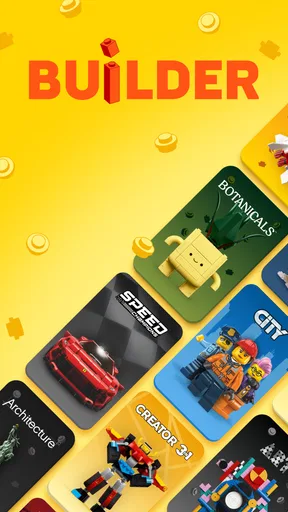

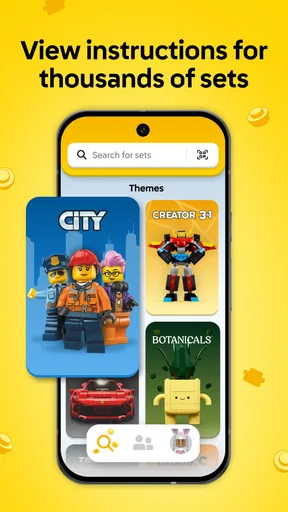
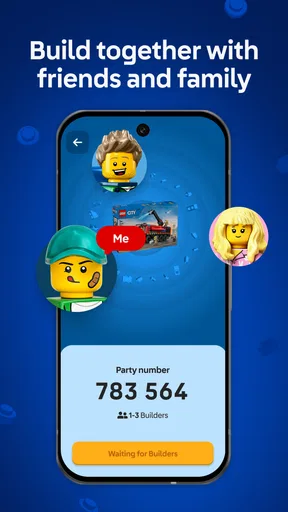
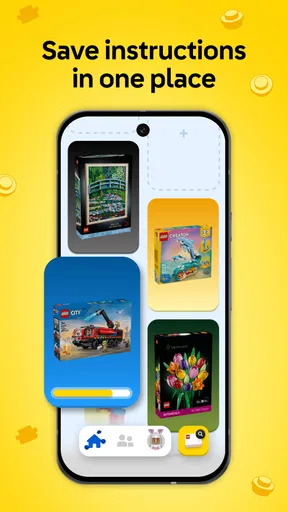
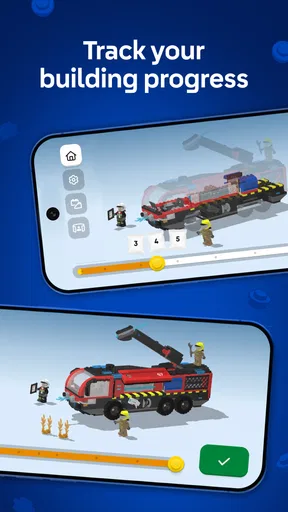
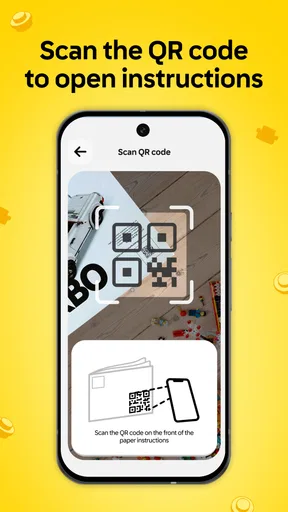

 Analysis by AppCompare
I enjoy building LEGO sets most when I can keep the pieces, instructions, and model in view without turning the table into a paper-juggling exercise. That is where LEGO® Builder: 3D Instructions makes its case: it turns the building guide into something I can inspect from different angles, rather than asking me to interpret every step from one fixed drawing. In my experience, that change matters most when a connection is hidden behind another part or the picture is hard to read at a glance.
Why a movable view can make a step clearer
Printed instructions are still perfectly usable, and for many straightforward builds they may be all you need. But a page can show only one view at a time. When two similar-looking pieces meet at an awkward angle, I sometimes have to pause, compare the drawing with the model, and turn the build in my hands to work out what the illustration means. A 3D view gives me another way to resolve that uncertainty: I can rotate the model on screen and check how the pieces sit in relation to one another.
That is a practical aid, not magic. A movable model is most useful when I already know roughly which part of the build I’m looking at. If I spin the view without a clear question in mind, it can be easier to lose my place than to find the answer. I get better results by first matching the current step to the physical build, then rotating only enough to inspect the connection I’m unsure about. The best use of 3D is targeted checking, not constantly turning the model for its own sake.
How I would use it at the building table
Finding a guide is part of the workflow, too. The app can search using a set number or a barcode scan, which gives me two useful routes: type in the number if the box or paperwork is nearby, or scan when I have the packaging in hand. That flexibility is especially handy when I’ve put a manual away somewhere and want to get back to building without searching through a drawer first.
Once the instructions are open, I’d set the phone or tablet where I can glance at it without reaching across the loose bricks. I’d work through a step, check the part list, and only rotate or zoom when a detail needs a closer look. This simple arrangement helps keep the screen from becoming a distraction. It also makes the app more useful for a parent sitting beside a child: one person can follow the next step while the other finds the listed pieces, instead of both trying to decipher a small printed image.
A realistic example is a build paused after dinner, with pieces gathered on a shared table and the instruction booklet nowhere nearby. I can search for the set, reopen its guide, and pick up at the step that matches the partially built model. The app’s step-by-step view and per-step part list can help me check what belongs next before I start sorting through the pile. That is a small convenience, but it can make returning to a project feel less like starting over.
Where it fits among building aids
For a LEGO set, the obvious alternatives are the paper manual and a static digital guide. Paper is reliable, needs no screen beside the build, and is often easier to share across a table. A fixed digital page can be quick to consult, but it has the same limitation as a printed picture when a connection is hidden. The interactive view is the reason I would choose this app for a confusing assembly step; I would not assume it makes every step faster.
Worth Reading Before You Choose

Flipboard Shows What News Apps Must Do Beyond the Feed

Switching to Android Auto Means Rethinking Your Driving Routine

Google Calendar Makes a Crowded Week Easier to Manage

Ludo King Makes the Most of the Minutes Between Plans

Baby Panda World Brings Quick Play to Modern Phones, but Its Game Library Feels Busy

ESPN’s Live Game View Makes Following Close Games Easier
There is also a useful difference between this and a general-purpose note-taking or collection app. Those tools may help me keep track of projects or organize information, but they do not replace a set’s visual building sequence. LEGO Builder is focused on following instructions, locating the right guide, and inspecting the model while I build. If my main goal is simply to keep a paper manual open, I may prefer the paper. If I want to understand a tricky orientation, the movable view has a clearer purpose.
One practical trade-off is screen space. A larger display can make it easier to see the model while keeping bricks spread out on the table, whereas a phone takes up less room but may require more zooming and repositioning. I would choose whichever device I can glance at comfortably; there is little benefit in having 3D controls if the model itself is too small to inspect. And because the app is a companion to building rather than a substitute for the bricks, it suits people who already have a set to work on, not someone looking for a standalone game.
First Impressions
Right off the bat, the app’s interface is sleek and user-friendly. You’re not greeted with a cluttered home screen, which is a relief. Instead, it’s straightforward and intuitive, making it easy to jump straight into building. The app is designed to help you construct LEGO sets with 3D instructions, which means you can view each step from any angle. Talk about a revolution in the LEGO world!
Diving into the Features
The standout feature, of course, is the 3D instruction capability. Instead of squinting at tiny diagrams or flipping through pages, you simply zoom in and rotate the model on your screen. This allows you to see exactly how each piece fits into place, reducing the trial-and-error approach that can sometimes turn a fun building session into a frustrating ordeal.
Another cool feature is the search function. You can quickly find instructions for thousands of LEGO sets by entering the set number or simply scanning the barcode. This saves a ton of time, especially if you have a massive collection and can't remember where you left the manual.
Building Experience
Using the app while building is like having a digital assistant by your side. The step-by-step instructions are clear, and the ability to manipulate the model in 3D makes it much easier to understand what you're doing. It’s particularly helpful for younger builders or those new to LEGO, as it removes much of the guesswork.
One feature I found particularly thoughtful is the part list for each step. If you’ve ever spent ages searching for a single elusive piece, you’ll appreciate this. The app highlights the pieces you need, so you’re not left rummaging through your stash in frustration.
Compatibility and Performance
Now, you might be wondering about the app’s performance. I tested it on both Android and iOS devices, and it runs smoothly on both. The 3D models load quickly, and I didn’t experience any crashing or lagging, which is always a concern with apps that rely heavily on graphics.
The app supports a wide range of devices, so whether you’re using a smartphone or a tablet, you should have a seamless experience. Just make sure your device is up-to-date to enjoy the best performance.
What to expect before downloading
LEGO System A/S makes this free entertainment app, which is rated for Everyone. It has an average rating of 4.8 from around 254,000 ratings, with about 5,400 written reviews, and has passed 10 million installs. It first appeared on December 6, 2019; version 4.3.3 is listed for devices running at least OS 8.1. Those figures suggest that many builders have found a reason to keep it around, but they do not change the practical question: does it cover the set you want to build, and do you prefer following instructions on a screen?
I would check that the set guide is available before planning a whole building session around the app. Searching by set number is a sensible first try when you have it; barcode scanning is handy when the box is present. If neither is convenient, the printed booklet remains a straightforward fallback. This is also why I would not treat the app as a replacement for every manual in a collection: its value depends on finding the relevant instructions when you need them.
The minimum OS requirement is worth checking before installing, particularly if you plan to use an older device as a permanent building-table screen. For a child’s build, I’d also set the device up where it can be seen without being in the way of the pieces. That practical detail matters more than the novelty of the 3D view; the guide helps only if it is easy to consult while hands are busy assembling the model.
When I would choose something else
I would skip the app for a simple set if the paper guide is already clear and I want to keep screens away from the table. Some people simply concentrate better with a booklet they can turn and point to. The app is also not a general inventory manager or a substitute for sorting loose bricks: the part list helps identify what a particular step calls for, but the useful job here is following a set’s instructions, not cataloguing an entire collection.
It may be less convenient when the phone is small, the workspace is crowded, or several builders want to look at the guide at once. In those situations, a tablet or a paper manual can be easier to share. I would also avoid interpreting a smooth-looking 3D model as a guarantee that every question will answer itself; I still need to compare the on-screen step with the real build and make sure I have advanced to the correct point.
For a newcomer, that last habit is useful. Before attaching anything, I’d compare the pieces shown for the step with the pieces on the table, then check the model’s orientation against the build already in hand. If something looks wrong, pausing to rotate the view is better than forcing a connection and discovering several steps later that a part was turned around. The app can reduce guesswork, but careful building still comes from checking each move.
Final Thoughts
So, is LEGO® Builder: 3D Instructions worth the download? Absolutely! Whether you’re a seasoned LEGO pro or a newcomer just getting started, this app is a must-have tool. It takes the stress out of building and adds a layer of enjoyment with its interactive and engaging design.
LEGO building should be fun, not frustrating, and this app ensures that each session is just that. With its innovative features and user-friendly interface, it’s a fantastic addition to any LEGO enthusiast’s toolkit. Go ahead, give it a try, and watch your building experience transform!
Who gets the most from it
I’d recommend it most to builders who regularly misplace manuals, people who find flat diagrams hard to interpret, and families helping younger builders work through a set one step at a time. The combination of a searchable guide, a per-step parts view, and a model that can be inspected from different angles gives each of those users a specific reason to open it. Experienced builders can benefit too, especially when a hidden connection makes a familiar-looking step less obvious than expected.
If you build only occasionally, prefer paper, or mainly want an app for planning and managing a collection, it may not change your routine much. I see it as a focused companion rather than an essential tool for every LEGO owner. When a set’s printed booklet is already doing the job, there is no need to switch; when a step is unclear or the manual has gone missing, having a digital guide ready can make getting back to the build noticeably easier.
Pros
- Intuitive 3D building guides.
- Wide variety of LEGO sets included.
- Offline access to instructions.
- Regular updates with new sets.
- User-friendly interface.
Cons
- Limited to official LEGO sets.
- No customization options.
- App size is relatively large.
- Requires modern devices for smooth performance.
- No community sharing features.
FAQs for LEGO® Builder: 3D Instructions
What is LEGO® Builder: 3D Instructions?
LEGO® Builder: 3D Instructions is an interactive app that provides step-by-step 3D instructions for building LEGO sets. The app offers a digital way to construct models, enhancing the building experience by allowing users to zoom, rotate, and explore each step in detail. It's designed to assist both beginners and experienced builders.
Is LEGO® Builder: 3D Instructions free to use?
Yes, LEGO® Builder: 3D Instructions is free to download and use. However, while the app itself may not require a purchase, access to certain LEGO set instructions might depend on owning the corresponding physical LEGO sets. Always check for any in-app purchases or premium content that may be offered.
What devices are compatible with LEGO® Builder: 3D Instructions?
LEGO® Builder: 3D Instructions is available for both Android and iOS devices. Ensure that your device runs on a compatible operating system version—usually the latest or recent versions—to enjoy optimal performance. Check the app store for specific device compatibility and any additional requirements that might be needed.
How does LEGO® Builder: 3D Instructions enhance the building experience?
The app enhances the building experience by providing interactive 3D models that users can manipulate. This feature allows builders to view each step from different angles, zoom in for a closer look, and rotate the model to understand complex sections better. It's especially helpful for younger builders or those new to LEGO.
Can I use LEGO® Builder: 3D Instructions offline?
While you need an internet connection to download the app and any updates, LEGO® Builder: 3D Instructions might offer offline access to downloaded instructions. It's advisable to download any necessary content beforehand if you plan to use the app without an internet connection. Check the app settings for offline availability options.


